Introduction to ShipSure Vessel Finance

The ShipSure Vessel Finance application connects the ship and shore based operations enabling them to communicate in real time through replication
- For the Office : When the office user logs into the ShipSure application they will have access to the Finance Module for either Entity or Vessels
- User profiles : Define which modules within the ShipSure application are available for Accessing, Actioning or are Read Only
ShipSure Benefits
Overview of the status and for the control of vessels for which we are responsible
Process Responsibilities
Supporting operational and technical functions involved in vessel operations
Accountants and Superintendent authorisation where and when required
- Invoicing enables the user to access the Invoice Comparator, Cost Approval, Register Non PO Invoices /Credits and Vessel Cost Approval modules
- Ledger enables the user to access General and Purchase Ledgers and the Sales Ledger
- Accounts Payable enables the user to access Vessel and Entity Accounts Payable and Payment Enquiries
- Accounts Receivable enables the user to access Entity Accounts Receivable
- Sales Invoicing enables the user to access Invoice Operations, Admin Tools, Configure Rate Schedules and Sales Invoice Template
- Maintenance enables the user to access Master Chart of Accounts, Accounts Library, Currency Rate Maintainer, Maintain Tax Codes and Credit Note Reasons
- Vessel Maintenanceenables the user to access Accounting Company, Chart of Accounts, Client Chart, Company Bank, Auxiliary and Auxiliary Flag Maintenance, Standard and Client Report Definition and Running Cost Recalculation
- Vessel Period End Process enables the user to access Controller, Roll and Clear, Exchange Revaluation, PO and Invoice Accruals and Other Accruals
- Analysis enables the user to access Running Cost Drill down & Budget Analysis
-
Enables the user to access to multiple reports and extracts
-
i.e. Profit & Loss, Balance Sheet, Running Costs - Drill Down, Outstanding Invoice, Trial Balance, Client Account Ledger, Voyage Results, Commitments Listing, Paid Invoices, Client Trial Balance, Expenditure Statement, Open Transaction, Auxiliary Code & Creditor Analysis, Funding Position Reports
-
-
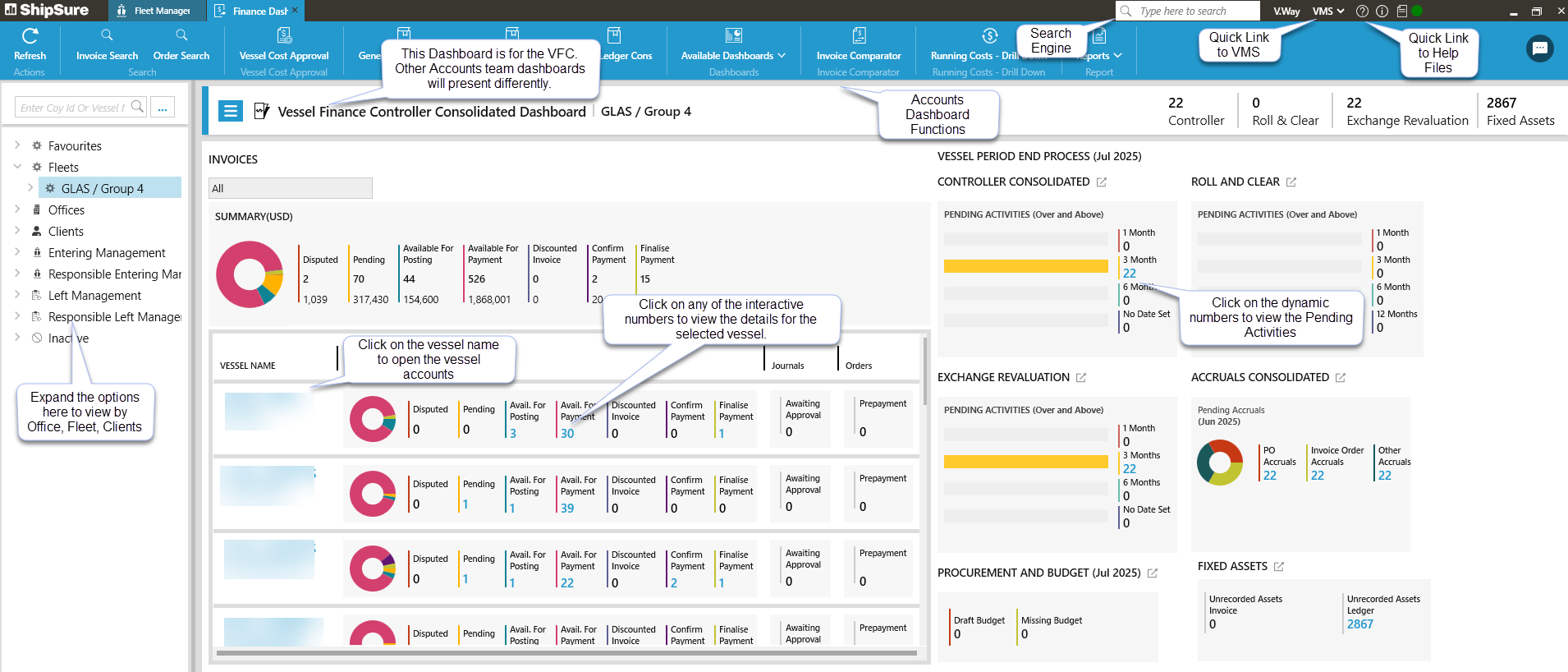
Each dashboard is specific to the user's profile / accountant job role
-
The Accounts Dashboards can be populated to be viewed by Individual vessels or by a Fleet of vessels
-
When an Accountant opens the Accounts module it will default to open displaying the vessels assigned to the user who is logged in
-
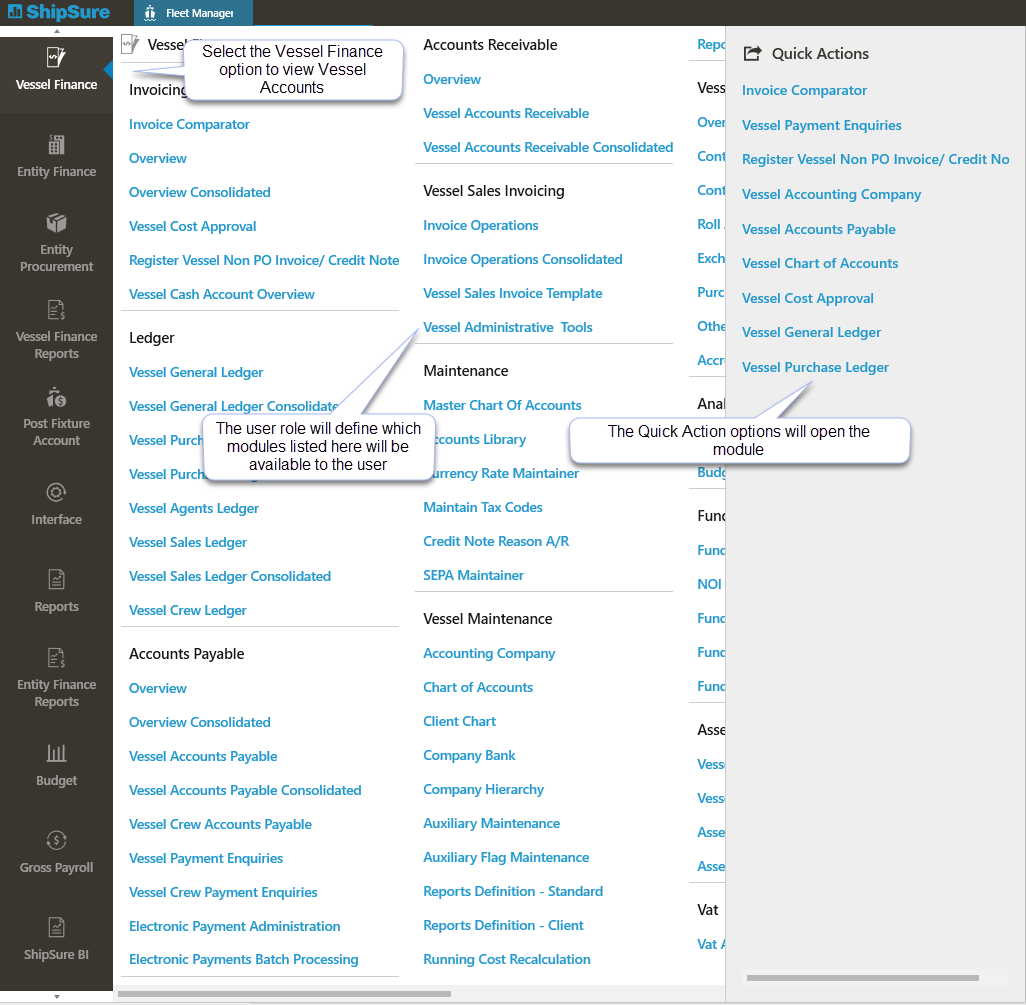
Below is a list of the various modules that can be accessed within the Vessel Finance applications.
-
All access to the modules is strictly Role based
-
Users can access the modules by clicking on the ShipSure icon
-
A list of modules where applicable to the job role will appear listed
-
Select the Finance icon from the list
-
Now click on whichever section is required i.e. Invoicing, then select from the dropdown list i.e. Vessel Cost Approval to access the area of the Finance module required
- Invoice Comparator
- Overview
- Vessel Cost Approval
- Register Vessel Non PO Invoice / Credit Note
- Vessel General Ledger
- Vessel Purchase Ledger
- Vessel Agents Ledger
- Vessel Sales Ledger
- Overview
- Vessel Accounts Payable
- Vessel Payment Enquiries
- Electronic Payment Administration
- Electronic Payments Batch Processing
- Overview
- Vessel Accounts Receivable
-
Invoice Operations
-
Vessels Sales Invoice Template
-
Vessel Administrative Tools
- Master Chart of Accounts
- Accounts Library
- Currency Rate Maintainer
- Maintain Tax Codes
- Credit Note Reason A/R
- Accounting Company
- Charge of Accounts
- Client Chart
- Company Bank
- Auxiliary Maintenance
- Auxiliary Flag Maintenance
- Reports Definition - Standard
- Reports Definition - Client
- Running Cost Recalculation
- Overview
- Controller
- Roll & Clear
- Exchange Revaluation
- Purchase - Order & Invoice Accruals
- Other Accruals
- Running Cost - Drill Down
- Budget Analysis